HF Inverted L, dipole, and Yagi MP3 Comparison

One of the most common questions from any amateur new to the HF bands is, what antenna is the best? This is a question that is almost impossible to answer simply, and you can guarantee everyone has a different opinion! By the way, the word ‘antenna’ is interchangeable with ‘aerial’, they both mean the same!

Generally, a large aerial is best for the low end of the HF spectrum, where the wavelength is long, and a much smaller antenna will give you better results on the higher HF frequencies, where the wavelength is shorter.

This is the main reason many amateurs will use more than one antenna, but just as many will use one aerial, either a large wire one giving better results on the low bands, or a small aerial favouring the higher bands. As they are using just one antenna, they accept it will be a compromise and work better on certain bands than others.

If the aerial is resonant on a given frequency, this means it is exactly the right length. This also means the correct impedance is seen by the transmitter, and all of the power generated by the transmitter can be radiated through the antenna. The aerial is said to be a good match.

If you have an aerial that is too long or too short for the given frequency, the aerial will not be resonant, and the transmitter will not be able to transfer full power, the aerial is therefore a poor match.

Fortunately, if the antenna is not too far away from resonance, it can be matched with a matching unit, otherwise known as an Antenna Tuning Unit.

The same is true for received signals, the longer or shorter the antenna is from the resonant length, the poorer the incoming signal will be unless matched. If the aerial is far too long or far too short it may be impossible to match, depending on the matching unit.

If you have a small garden, the most practical solution will be to have just one antenna. Fortunately, one antenna can be made to have multiple band characteristics, and there are a variety of methods employed to give low impedances on multiple bands. The antenna will still be a compromise on certain bands, but not everyone has the space needed for an Antenna Farm!

In my experience, it can be important for a blind operator to use a low impedance antenna. If the aerial has low impedance characteristics on multiple bands, it is likely the operator will be able to match the aerial using the automatic antenna tuning unit built into the radio. This built in antenna tuning unit or ATU will only have a limited range, and only be able to deal with small impedance variations.

The aerial I have used for many years is the trapped dipole. It is a wire antenna and is T shaped in profile. The feeder rises vertically to a T piece at 40 feet high, and the signal is radiated by the wire element, extended each side of the T piece. The overall length of the wire is 106 feet, or 53 feet each side of the T piece. Each leg of the element contains a 40m trap. This means that moving from the T piece, the wire extends for about 33 feet, there is then the trap, and the wire extends approximately a further 20 feet. On the 40m band, the traps isolate the final 20 feet of wire on each side of the dipole, but the whole length of the antenna is used on each of the other bands. Because of the 40m traps, The trapped dipole can be tuned on multiple bands with an internal Antenna Tuning Unit.

My second HF antenna is a Yagi beam. It is a Steppir 3 element Yagi, and the elements mechanically adjust to the correct length for the chosen frequency. The advantage of a beam is its ability to focus the signal in the chosen direction. Whilst most serious DXers (hams wanting to work long distances) will use a beam, they are relatively large, and require a strong mast and a method of turning or rotating the beam. The Steppir is a 3 element beam on 10m to 20m, and a rotary dipole on 30m and 40m.

The subject of this review is the trapped inverted L with very limited grounding. This antenna is more suited to a smaller garden, and gives access to all the HF bands. I literally wince at the prices of some of the small multi-band verticals, but my trapped inverted L was homebrew.

Basically, the trapped inverted L is equivalent to just one leg of my trapped dipole. The length is 53 feet, and the 40m trap is about 33 feet from the feed point, with a further 20 feet of wire to the end.

The feeder, or in this case the coax, runs along the ground to the base of the aerial. Here we mounted a small connections box on a copper ground rod driven into the earth. The coax is split, with the outer screen connected to ground, and the inner conductor bonded to the base of the inverted L wire.

With all antennas, it is important to get it off the ground and as far from surrounding obstructions as possible. In my case we used the bough of a tree to take the wire vertically up by about 20 feet to a pulley, and the remaining 33 feet was pulled horizontally to another support. If you don’t have a tree handy, your pulley could be at the top of a 20 foot pole.

As you can see, you now have an inverted capital letter L. Ideally, the vertical section needs to be at least 20 feet high, but can be as high as you can get it. The higher it is, the less wire will be left to pull horizontally.

So, my inverted L rises vertically 20 feet. Turns at a right angle and runs for about 13 feet to the trap, and then continues horizontally for the remaining 20 feet.

Ideally, the antenna’s grounding would be much more than one ground rod. I have no doubt it can be improved by adding radials, but this review is to see how the basic aerial performs. If you have a small garden, you will not have the space for radials.

In this RX comparison of the trapped inverted L with my other HF aerials, I have made recordings on each of the HF bands. I have marked the start of the inverted L with one beep, the dipole with two beeps, and the Steppir with three.

On 80m you will hear LY1TR in Lithuania, some 1100 miles. Firstly the inverted L followed by the stronger dipole, and then the sequence is repeated. Interestingly, RA4LHD in European Russia calls in at a distance of 1800 miles, and I think he is slightly stronger on the inverted L.

80m LY1TR

On 40m we hear GB4C in England, this is a local contact. Firstly he is quite faint on the inverted L, primarily because the inverted L is vertically polarized, and will favour a longer distance. There is not much to choose between the trapped dipole and the rotary dipole of the Steppir which is broadside to the station.

40m GB4C

Again on 40m we hear Jr1CFP in Japan at a distance of 6000 miles. The inverted L is slightly stronger than the trapped dipole, and the Steppir is the strongest, rotated towards the station.

40m JR1CFP

On 30m we hear SD7W in Sweden on IOTA EU-138 at a distance of 1000 miles. I think the inverted L is slightly stronger than the dipole.

30m SD7W

Again on 30m we hear ZP6CW in Paraguay at 6200 miles. Here, the inverted L is noticeably stronger than the trapped dipole.

30m ZP6CW

On 20m we hear EG5INT on a Spanish IOTA Island with a distance of about 800 miles. Here the inverted L is stronger than the dipole and not far off the beam. We hear the inverted L followed by the trapped dipole, then the Steppir, and finally the inverted L again.

20m EG5INT.

On 17m we hear VK2DX in Australia at about 9500 miles. Following The sequence of three, the inverted L is repeated.

17m VK2DX

On 15m we hear W7VJ in Washington at 4800 miles. The inverted L is receiving almost as clearly as the 3 element at over twice the height. I’m sure the beam would be showing a higher signal strength, but in terms of clarity there is not much to choose between them.

15m W7VJ

Again on 15m we hear W0IZL in Nebraska some 4200 miles.

15m W0IZL

On 12m we hear KU1T in West Virginia some 3700 miles. The inverted L is much stronger than the dipole, but there is noticeably much less noise on the beam.

12m KU1T

On 10m we hear 9A3TY in Croatia at 1000 miles. We hear the three antennas, and then the inverted L again. The inverted L is a workable strength, but with heavy QSB on the final clip.

10m 9A3TY

Again on 10m we hear KH7Y in Hawaii a distance of 7200. Faint on the inverted L, no copy on the dipole.

10m KH7Y

In summary, the trapped inverted L is suitable for a small garden, and is relatively low profile above ground, and has a tiny footprint on the ground. My antenna cost less than the 20m of coax used, and the 40m trap can be bought if you can’t make one. My inverted L was positioned down the garden, and pulled back to the house. I mention this because the horizontal part of the aerial is directly above the coax lying on the ground, and I recall reading somewhere this is desirable. Perhaps the coax acts as a counter poise.
Enjoying Amateur Radio despite pain and fatigue

By Quentin Cruse GW3BV

Amateur radio is a hobby and for some an obsession that can be enjoyed by almost anyone. Many people with disabilities enjoy amateur radio as it enables them to communicate with the outside world, gives them a sense of community and brings satisfaction through self education. However what if your health problems mean that you suffer with pain and fatigue? Would this mean that amateur radio is not for you? From personal experience I believe the answer is no.

First of all I must say that as a disabled person you already know that any task or enterprise you undertake, whether its trying to go shopping, having a shower or using your radio will take more energy, time and probably pain than most people will experience. However you endure such difficulties because you are alive and life is worth living. Therefore some of what I describe will take some effort to setup and get started. However the effort will be worth it!

Let’s say that you suffer with a lot of pain, perhaps including headaches. How can you enjoy and contribute towards amateur radio? One of the main issues I have with amateur radio is the noise. I know this may seem an obstacle with a hobby that appears to require you to use your ears, but its not as much of a problem as you may think. When using FM, perhaps on VHF/UHF, static and other QRM/QRN is going to be negligible and you may be able to engage in QSO’s with little difficulty. What though if you want to chase some DX or simply work further afield than your own locality?

To begin with I take the view that if I can only spend 10 or 15 minutes a day tuning across a couple of bands and having just one QSO with someone in a foreign country, I have had a good day. I have indulged my hobby, taken time for myself and learnt a little more about amateur radio and the world around me. However there are ways to do more and for me this mainly involves digital modes.

Digital modes can be found on all of the amateur bands and it is reasonably simple to get started. Most relatively modern rigs going back to the 1990’s will have the necessary ports on the back of the rig to enable connection to a computer. (It is possible to connect an older radio using the headphone socket and PTT line) An interface between the computer and radio will be required but these are available for as little as £30 or less. You will then need to install a suitable program on your computer to decode and transmit digital signals. There are many different ones available. I won’t describe how to set all this up as there are plenty of other guides available online.

The reason digital modes are so useful is that they do not require you to hear or listen to anything. They are primarily a visual mode. The software decodes the signal on your computer screen, normally using what is called a “waterfall” display. This gives a graphical view of the signals available. Clicking your mouse on a signal will cause the software to decode that particular signal. You will then see what the other amateur is sending as text. You can just “listen” or “watch”, reply to a CQ call or put out a call of your own.

I have found PSK31 to be probably the best and most popular digital mode available. It is straightforward to use and you can quickly make a few contacts. There is no need to deal with harsh static and the additional pain and fatigue this can bring. Most software will provide you with macro buttons. These are preprogrammed mini text files that are sent with a click of the mouse which give your details such as QTH, name, equipment etc. All of which should help to make the experience less tiring. In fact it is possible to have a QSO and only need to use the mouse. Most software will enable you to auto-fill the other stations callsign, name etc. into your macros. Additionally most of the software will incorporate a logbook to store your contacts. Some will also link to qrz.com giving you more information about the other amateur.

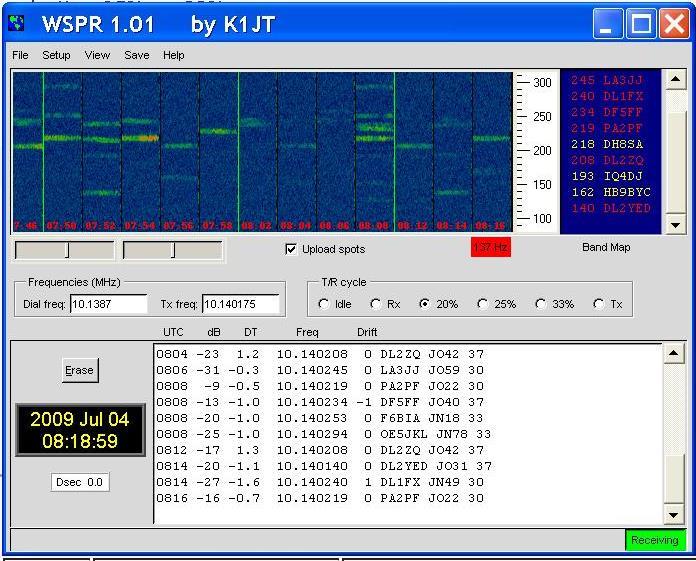
Another digital mode which I find very rewarding is the WSPR system. This is slightly different in that you do not make QSO’s in the traditional sense. Using WSPR your computer will transmit and receive very low power signals. The WSPR online database is updated by all users in real time. If your signal is heard in VK then the database will let you know. By the same method other amateurs will know if their signal has been heard by you. This system is very much automated, so once setup can be left to transmit and receive whilst you do something else. In my personal case I have often left WSPR running whilst I have a rest. I can then return to the shack after an hour or two and see who has heard my signal and who I have heard. I find it very rewarding and fascinating to track the changes in propagation across different bands over the months. To my mind WSPR is an excellent way to be involved in amateur radio and learning about propagation and aerials even though I am unable to be sat hunched over the radio for hours on end. Again there is a WSPR community which can enhance your enjoyment of this mode.

WSPR Screenshot

WSPR Screenshot

Of course these digital modes can be enjoyed by non licensed radio enthusiasts. They are also primarily low power modes, especially WSPR, so can provide a level playing field for those with foundation licenses.

So does pain and exhaustion have to be a barrier to enjoying the world of amateur radio? I don’t believe so. Most people with disabilities make adjustments to enable them to do different activities. For some it is using a wheelchair to play basketball, for others it will be playing bowls using adapted balls, for those of us in front of a radio it is no different. We simply have to do things in a way which we can manage and yet will still bring pleasure and satisfaction.

For additional information on WSPR visit G4ILO’s excellent website at www.g4ilo.com/wspr.html. Or of course the main WSPR website at www.wsprnet.org

For extra information PSK31 and setting up an interface try www.bpsk31.com and http://www.mymorninglight.org/ham/psk.htm

Yaesu G-1000DXC Accessibility Review

Accessibility evaluation of Yaesu G-1000DXC Rotator

By Kelvin Marsh M0AID

January 2013

During a recent conversation with Rob G0WSC, he told me he was installing a new Yaesu G1000 DXC rotator, and he was looking forward to having computer control. I was immediately interested, because if computer controlled, the rotator would be accessible for a blind user. Rob then mentioned he could adjust the bearing by turning a knob and pressing a button. This all seemed very promising, so Rob brought his rotator control box over to my QTH for me to have a look at.

Picture of G1000DXC control box

The Yaesu G1000 DXC is classed as a heavy duty rotator, capable of turning a full size 3 element HF beam. The rotation torque inch / lbs is 950, and the braking torque inch / lbs is 5200 (figures taken from the Vine Communication rotator comparison table).

Looking at the other Yaesu rotors, I would say it is in about the middle of the range. The control box was marked T1AL, and was 200 x 130 x 193mm, and weighs 2.8kg.

It turns out Rob is not actually going to control the rotator from the PC, but from his Yaesu DMU. But, looking at the control box, the rotator appears to be completely accessible as a standalone unit.

My very first rotator was a Kenpro KR600. This rotator had Clockwise and Anticlockwise levers, but the needle was hidden under the glass facia. Fortunately, the axle for the needle protruded through the glass, and we were able to fix a tactile pointer to this central boss, on the outside of the glass. This meant I could hold down either lever and feel the direction of the antenna as the pointer moved.

The G1000 DXC control box is several times better than this. Firstly, it has a tactile knob allowing you to select the bearing. I guess the knob is about an inch in diameter, and has a small bump on the front face. Just turn the bump to the 9 o’clock position, and this will equate to a bearing of 270 degrees, or West. Then, just press the Start button, and the rotator will turn. There is no need to keep your fingers held on either the Clockwise or Anticlockwise buttons!

We then had a look at the glass plate covering the analogue direction pointer. Much to my surprise, the glass plate is designed to be removed, so a more detailed clock face can be fitted! Within seconds, the glass cover was off, and I found the direction pointer to be very tactile. I do not know how robust the needle would be, if the glass cover was permanently removed, and the pointer continually checked.

It is possible to connect the G1000 DXC to a PC for computer control. This requires an additional Yaesu interface box with appropriate cables, but the unit appears to be very expensive. In fact, I found the price to be very slightly more than the rotator itself! The interface model is GS232A and measures 110 x 21 x 138mm, weighing 380gms.

There is also a small knob on the control box to adjust the speed of the rotator. As there is no automatic slow start and slow stop on this rotator, I assume it would be easy to increase the speed manually if you are moving the rotator over a large distance, but decrease the speed again for the stop.

In summary, the Yaesu G1000 DXC seems to be perfectly accessible as a standalone rotator control box. You can either select the heading using the tactile knob and then press the start button, or you can hold either the Clockwise or Anticlockwise buttons and monitor the pointer with your fingers. Connecting the rotator to a computer is possible, but unless I am mistaken, appears to be very expensive.

Finally, if you are looking at the G1000DXC based on this evaluation, please make sure the control box is the same. I can well imagine the rotator could be supplied with another controller. Likewise, other Yaesu rotators in the range.

Comment 1:

By Tim GI4OPH, January 2013

Very interesting. Prior to owning the PST rotor, I used a Yaesu g1000sdx for around 8 years. The controller appears to have been re-designed, as there was no pre-set control on the original unit I had here.

I employed the method of removing the glass facia plate to great effect. The direction pointer was reasonably robust, and providing one wasn’t too heavy handed, it remained in place.

It certainly made for a very accessible method of rotator control, which has been made even better with the addition of the pre-set facility.

Comment2:

By Alan R. Downing KD7GC July 2013
The Yaesu rotors are good, particularly the G1000 and G2800. I turned my 4 element SteppIr with a G1000 for 5 years without problems, and when I replaced the 4 element SteppIr with the much larger DB36, I bought the largest of Yaesu’s line, the G2800. I just took the front cover off and I touch the needle to find out where the rotor is pointing, and I have never moved the needle inadvertently. The G1000 and G2800 both have a button that
can be pressed to turn the rotor from where ever it is to a preset direction. the rotor will automatically go to where you had set it up to go. There is a knob that you can adjust the stop point to, so when the button is pressed, the rotor goes to that set point. I set mine to stop at due North. So, no matter where I am pointing, the rotor always returns to North. I don’t know if the G800 has this feature or not, but just call HRO, and they could tell you.
If you intend to only put up a small yagi, the G800 may well be adequate, but if you are putting up a large yagi with many square feet of wind load, then opt for the G1000, or if the yagi will be huge, better go for the G2800.
Yaesu rotors are not cheap. I don’t remember what the G800 costs, but I think I paid about $800 for the G1000, and over $1500 for the G2800.

Related Downloads

G800DXA G1000DXA and G2800DXA rotator and control box MP3 Manual

Yaesu FT-2000 Accessibility Review

Accessibility evaluation of Yaesu FT 2000.

I have wanted to evaluate the FT2000 for some time. My good friend Rob G0WSC has been using the FT 2000 for about four years, and whilst Rob is sighted, it became obvious that once initially set up, the Menu seldom needed to be accessed again. In terms of accessibility, the main challenge for a blind operator using the FT 2000 is the lack of a voice synthesiser. Therefore, obtaining the frequency and mode information requires a connection between the radio and a PC. This evaluation is therefore slightly different from the ‘stand alone’ reviews I have conducted previously, as it is indeed possible to use an apparently inaccessible radio with no voice output, if a computer can be operated.

FT2000

YAESU FT2000

On paper, the FT2000 is an interesting radio. Even for a blind operator, it has certain features that make it worth investigating, even without speech output. I have had the FT2000 here on the bench for a couple of days only, and so this accessibility review can only really be my impressions on the radio, and I would encourage any blind amateur to do more research and check out my very superficial observations.

The radio is physically large, measuring 410 x 135 x 350 mm and weighing 15 kg. It covers 160m to 6m. I evaluated the 100W version, and there is also a 200W model. The version I tested has an internal PSU and the radio is plugged directly into the mains.

For its price point, I believe the FT2000 is currently the most inexpensive radio with separate receivers. The sub receiver must be on the same band as the main receiver, but it is possible to monitor different signals in each ear, using stereo headphones. As I have mentioned in previous evaluations, my usual operating practice is working DX, and this inevitably involves working on Split frequencies. I personally gain great benefit by listening to the DX station transmitting in my left ear, whilst I am looking for a pattern in his RX frequency range, listening with my right ear.

As previously mentioned, this radio will need to be initially setup using the menu system. There is a wealth of information available on the Internet, including e-mail user groups, and many people have published information on their personal Menu setup. It is almost inevitable that a blind operator will need sighted assistance for this initial phase.

I connected the FT2000 to my PC via the RS-232 CAT port, and used my logging program and screen reader to speak the frequency and mode. The physical connection was made using a standard serial cable, connecting to a USB adaptor plugged into the PC. I simply unplugged my usual radio and swapped cables. For some reason, I expected the FT2000 to need a special interface cable, but this was not the case. All this was very straightforward.

As the radio is physically large, my initial impression of the front panel was of an overwhelming mass of controls. There are lots and lots of buttons and knobs, But it doesn’t take long to start understanding the radio’s layout. The radio is turned on by using a button at the top left corner, and the VOX button is conveniently positioned here too. There is a line of buttons on the left hand side positioned horizontally below the display. This row contains the dedicated buttons for Monitor ,Processor, AGC, Noise Blanker, attenuator and filter functions. These buttons are long and thin, and have the same beep regardless of whether you are turning the function on or off. There are differently shaped buttons at the end of the row to select A and B receivers. Below these buttons are two horizontal rows of large knobs of the concentric inner and outer type. These contain RF Power , Mike Gain, VOX Delay, Manual Notch ,and the RF and AF gain for the Main and Sub receivers.

Below and running along the bottom edge, are 8 buttons for transmitting any pre-recorded voice and CW messages.

To the right of the knobs are two further columns of buttons. The first column contains buttons for choosing the mode, and I was pleased to find individual buttons for USB and LSB selection. To the right again is another column of buttons containing the Split, and the TXW button, allowing you to quickly hear the Sub receiver signals.

The main VFO tuning dial is to the right of the previously described controls, and approximately in the centre of the front panel. Each revolution of the VFO moves 10khz, but I would imagine this can be changed in the Menu.

To the right of the main VFO are more buttons for controlling the Main and Sub receivers, the main numeric keypad, the Sub receiver VFO, the Clarifier knob, and the filter adjustment knobs.

It soon became obvious, there is literally a button or a knob for every common function. For a blind operator this is terrific. There is seldom a need to enter the Menu system, but there are a lot of controls to remember!

A brief note on the buttons. All of the buttons are hard plastic, and not the rubber type that drag on the finger tips as you slide your fingers around the operating area. The long thin buttons running under the display on the left hand side are very easy to use, but I found some of the other buttons were quite tricky to orientate myself around, because of their unusual shape. These buttons are not flat, but the tops are tilted, and with a slight concave curve. The buttons are closer to the fascia at the top and thicken slightly at the bottom. In the case of the numeric keypad, the buttons are quite noticeably concave, with the button being thicker at the top and bottom, and being recessed across the middle. This actually makes tactile manipulation more awkward. As you move your hands over the keypad, instead of feeling a block of 12 flat buttons, instead, you have lots of peaks and troughs to negotiate. Until you get totally familiar with the keypad, it is easy to mistake the space between the buttons, as a button itself. There was no tactile pip on the 5.

The keypad uses the Triple Stacking method for band changes, meaning, pressing the number three will cycle you through three different stored frequencies on 40m.

Direct keypad entry of a frequency was straightforward.

I have very little experience of using Yaesu radios, and this is mainly due to the range generally lacking a voice synthesiser. I was therefore new to some of the concepts on the FT2000. For instance, when you are tuning for 0 beat on a CW signal, the Yaesu will give you a visual indication to show you are on the exact frequency, and fortunately, there is also an audio indication. A button press will produce a 700 Hz tone, allowing you to tune, and match the incoming signal to the generated tone.

A maximum power limit can be set when tuning. This works for both the internal and an external ATU. Limiting the tuning power to 20 watts while keeping the TX power at 100 watts is very useful.

Having established the FT 2000 was relatively easy to use, I wanted to make sure I could easily use the split facility and the sub receiver. With a radio of this complexity there are several ways of being able to work split. Sighted operators may well find they never need to use the split function at all, as the Clarifier itself allows an adjustment over 10 kHz! But, from my own personal experience, I like to be able to put in a definite frequency, so I don’t need to keep checking the voice output.

If you are wearing stereo headphones, in the standard set up, you will hear the main receiver in both years. If you press the TXW button, you will hear the sub receiver in both years. A menu setting allows you to hear both receivers at once, the main receiver in your left ear, and the sub receiver in your right ear. As the menu is inaccessible, I am assured the ‘Dual Watch’ function can be assigned to the programmable CS button. I did not actually try assigning the CS button on this borrowed radio, so this is something to make sure of yourself.

If you want to set the split very rapidly, there is a single button option to set the split to a 5khz high shift. This default can be adjusted. But, I think the most straightforward way of setting the Split frequency at say 3kHz up, is to press A=B, to make the Sub receiver equal the Main. Then press A/B and press the microphone Up button three times, this sets the frequency on the Sub receiver. Then press A/B again to return to the Main, and finally the Split button. You are now ready for Split operation with a shift of three kHz.

A press of the TXW button gives a double beep if Split is on, and the Split frequency was immediately shown on the PC. The signal on the sub receiver is heard.

In summary, the FT2000 can be satisfactorily used by a blind operator, but for independent operation needs to be connected to a PC via CAT. Every common function has a dedicated button or knob, meaning the inaccessible menu is not required in daily use.

Related Downloads

None

MFJ 1026 Accessibility Review

Accessibility Evaluation of MFJ 1026 Noise cancellation Unit.

By Kelvin Marsh M0AID

January 2013

MFJ 1026 from the front

The MFJ 1026 noise cancelling system, front view with telescopic whip fitted

Recently, there was an interesting thread on the active elements reflector, regarding local electrical noise sources. These days, many radio amateurs live in electrically noisy locations, often with close neighbours in a modern housing estate.

Potentially, these local noise sources can make it very difficult, if not impossible, for radio amateurs to continue in the hobby. Very often, the electrical interference is so bad it literally overwhelms the weak incoming signals amateur radio operators strive to hear.

I was interested to learn that several sighted radio amateurs used noise cancelling units. Several of these units had been around for many years, but had been discontinued. Checking with the various suppliers, I found the MFJ 1026 was the modern equivalent, and was widely available.

Firstly, the unit is quite expensive. I have no doubt the manufacturer has done their very best to keep the costs down, but the MFJ 1026 is a significant investment at around £200 GBP. Therefore, I felt it was imperative to check the MFJ 1026 is accessible for a blind operator.

Reading the Manual, my first concern was how to handle the MFJ 1026 transmit requirements. Usually, the MFJ 1026 is connected between the radio and the antenna. This means it can receive incoming signals directly from the antenna, but has to potentially handle several hundred Watts of outgoing RF power when the operator is transmitting. The MFJ 1026 has some features to switch it to automatic bypass, but the Manual is at pains to point out, this method is not fool proof and is not recommended. It is suggested the MFJ 1026 is also connected to the radios PTT circuitry, and is thus switched to bypass, when RF power is applied. This means an additional cable must be fitted, and the specification will depend on the type of radio being used. The additional PTT control line may need to be added to the order, as fabricating the necessary cable could be difficult for an amateur with low vision.

Fortunately, my own radio gives access to incoming signals via coaxial links at the rear. I was able to use the appropriate connection and route the RX signal through the MFJ 1026, avoiding placing the unit in the path of out-going RF.

The MFJ 1026 works by receiving signals on two separate antennas. The noise is brought in by the auxiliary antenna and this is used to cancel the noise on the main antenna. The tricky part of the operation for a blind operator, is to balance the noise signal on both antennas. Usually, a sighted operator will use the radios signal strength meter, but I found it was easier for me to match the balance by ear. I found the best method was to turn the main antenna gain to maximum, so you hear the incoming signal and noise at full strength. I then made a mental note of the noise volume, and turned the main antenna gain completely down. I then brought up the noise on the auxiliary antenna to the same level. The final step involves careful adjustment of the Phase Delay, until the noise is effectively removed.

At this point it is worth mentioning, I had good success using the MFJ 1026 internal whip as the auxiliary antenna. This was very effective at picking up a local noise source . Thus, the main antenna would receive both the radio signal and the noise, whilst the whip antenna would only pick up the noise. The unit can also be used with an external auxiliary antenna, but during my limited testing I found I did not have much success in reducing noises from further afield.

Fortunately, I do not have much interfering electrical noise at my QTH. During the test period, the only local noises I found were a couple of spot frequencies on 15m, when my beam was turned towards the south.

You will now hear a recording of Z81D in South Sudan. The signal is very weak, and without the MFJ 1026, would have been affected by the local noise. Either side of the frequency was in fact clear of noise, but Z81D was just on a bad spot! During the recording, you will hear me calling the station myself, and Z81D making three QSOs. Although these are faint they are without interference, but as he is exchanging signal reports with each station, I briefly turn off the MFJ 1026 and you can hear the rasping interference for a few seconds each time. Whilst these signals are on the limit, you can hear that in this instance, the reception would be virtually impossible without noise cancellation.

Z81D on 15m

Next is a recorded demo of the MFJ 1026 in action. I use the unit to eliminate an electrically generated noise from the 80m band

Audio Demo on 80m

1026 from the back

Related Downloads

MFJ 1026 MP3 Manual
MFJ 1026 PDF Front Panel Layout